







Tip Menu Ideas for Camming: Items, Prices and a Template
Safe-for-work tip menu ideas for cam models, how to price them in tokens, what each price is worth in dollars, and how to revise your menu every week.

The best tip menu ideas for camming are small, repeatable things you can do on camera every time someone pays for them: a shout-out, a song request, a dance or a set of squats, an outfit change, a spin of a prize wheel, a level on an interactive toy, and one or two bigger items for your regulars. Price them as a ladder in tokens, from a cheap item anyone can afford to a few premium ones, keep the list short enough to read in seconds, and revise it every week based on what actually sells.
Below you will find ideas grouped by type, a pricing method, what each price means in dollars for the viewer and for you, a sample menu you can copy, and the rules every item should pass.
What a tip menu is and how it works on a cam site
A tip menu is a priced list of actions a model posts in her room: tip this many tokens and this happens. It turns a vague “tip if you like the show” into a specific choice with a price, which is why it is one of the first tools new models set up when they learn how cam modeling works.
On most cam sites the public room is free to watch. Viewers who want to interact buy tokens and spend them on tips, menu items, goals, interactive toys and private shows. If tokens are new to you, the mechanics are laid out in how cam sites work. The menu sits inside that system: every item is a token price, and every token a viewer spends is credited to you at your site’s per-token value.
The menu is not your whole income. It works alongside tip goals, private shows and content sales, which are covered step by step in how to make money camming. What the menu does well is give quiet viewers an easy first purchase and give regulars a reason to keep tipping during a long public show.
Tip menu ideas for camming, by category
Every idea below is safe for work on purpose. Adult requests belong on many menus too, and the same structure applies to them: name each one clearly, price it on the same ladder, and list only what you will do every time, within your site’s rules.
Say hi and get noticed
- Say your name and a personal hello
- Shout-out to the room, or a thank-you on your on-screen tipper list
- Pick an emoji or a word for the room topic
- Choose my next drink or snack
- Blow a kiss or wave at the camera
These are your entry items. They cost little, take seconds and make a first-time viewer feel seen, which is often what turns them into a regular.
Music and mood
- Song request (one song, your choice of what plays next)
- Skip the current song
- Little dance to the next song
- Change the lighting color or the background
- Pick the theme of the next hour (cozy, party, gaming, chatting)
Moves and fitness
- Ten squats, or a set of stretches
- A yoga pose the viewer picks
- A twirl, a spin or a short dance
- Stand up and walk around the room
- Plank for 30 seconds
Models in camming forums swap ideas like these all the time because they are easy to repeat, fun to watch and need no props.
Wardrobe
- Pick my next outfit from two or three options
- Put on heels, or change shoes or socks
- Wear a hat, a wig or a costume piece for the rest of the show
- Theme night outfit (sports jersey, formal, holiday)
Games, goals and bundles
- Spin the prize wheel (each slice is an item from your menu)
- Roll the dice for a random item
- Truth question, kept friendly
- Trivia round: the winner picks the next song
- Bundle: three songs and an outfit pick for less than buying them separately
Games work because the outcome is uncertain, so viewers tip more than once to see what comes up. A bundle gives a bigger tipper a reason to spend at once.
Treats
- Buy me a coffee (you drink it on camera later)
- Cheers: raise a glass with the tipper
- Name the next treat you order
Some models keep these in a separate “treat” section so viewers who just want to say thanks have an obvious option that asks nothing of the show.
Interactive toy levels
If you use a tip-activated toy, its levels act as their own menu: a small tip for a short, low reaction, larger tips for longer and stronger ones, and a special pattern at the top. Name the levels plainly (Level 1, Level 2, Level 3, special) and post the token range for each. Viewers can see which sites support these toys in our list of Lovense cam sites.
Personal extras
- Birthday or anniversary message for the tipper
- Short voice note or video greeting, where your site allows it
- Custom clip on a theme the viewer picks, where your site sells clips
- Be my room moderator for the night
- VIP item: first say in tomorrow’s show theme
These sit at the top of the menu. They take more of your time, so they carry the highest prices.
How to price a tip menu
Price your tip menu as a ladder with four tiers. Each tier has a job, and every item belongs on the rung that matches the time and effort it costs you.
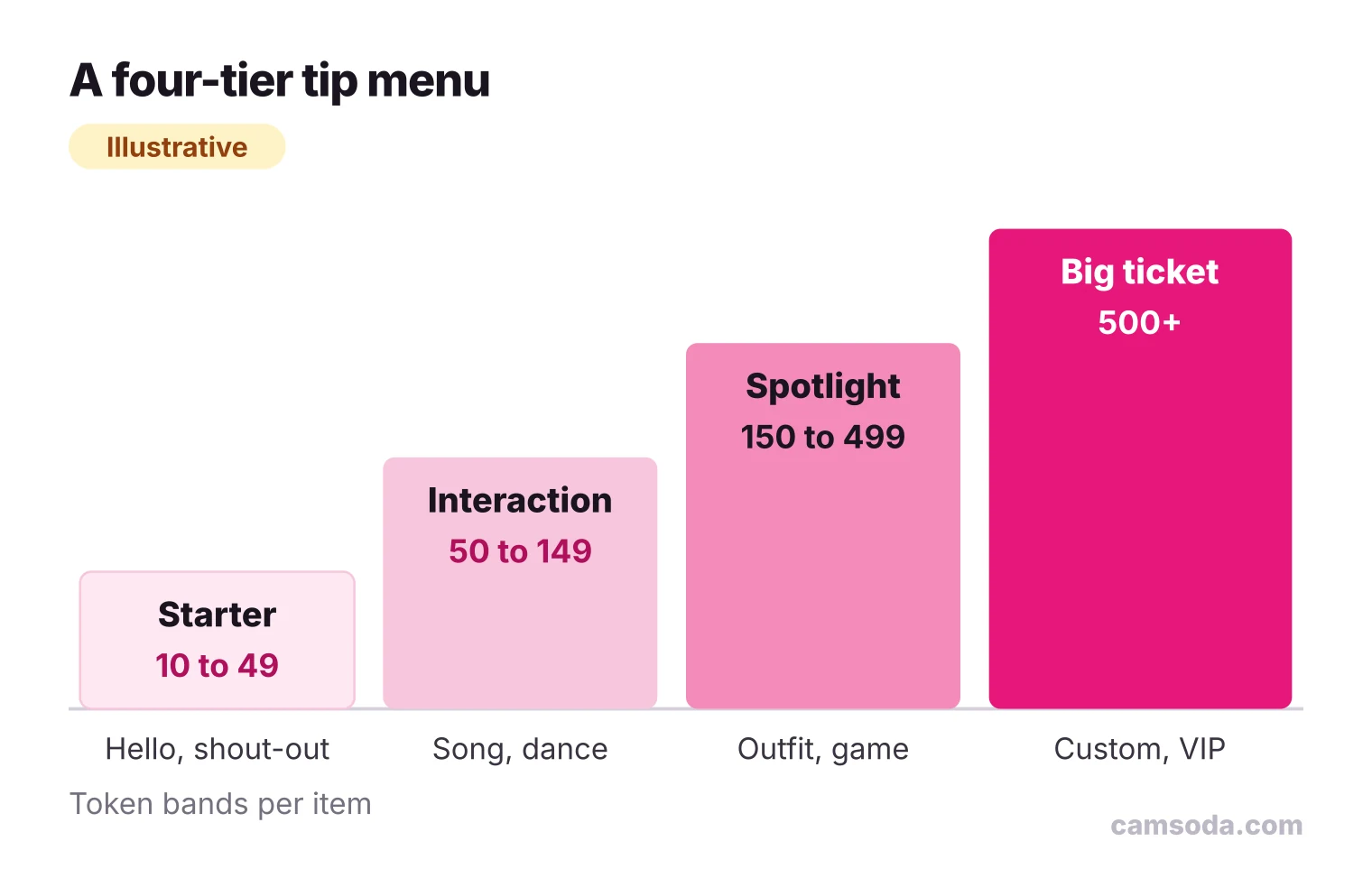
- Starter (illustrative: 10 to 49 tokens). Things that take a few seconds: hellos, shout-outs, an emoji pick. Their job is to get a first tip from someone who has never tipped.
- Interaction (illustrative: 50 to 149 tokens). Things that take under a minute: a song, a little dance, a set of squats.
- Spotlight (illustrative: 150 to 499 tokens). Things that change the show for a while: an outfit pick, a theme hour, a wheel spin.
- Big ticket (illustrative: 500 tokens and up). Things that take real time or that only one person gets: a custom clip, a VIP item.
Three rules decide where an item goes:
- Time on camera. The longer an item takes, the higher the rung. A ten-second hello and a five-minute theme change should not cost the same.
- Repeatability. Items you can do twenty times a night stay cheap. Items you can do once a night, or that change the whole show, go higher.
- Exclusivity. Anything that only one viewer receives (a custom clip, a personal message) is priced above anything the whole room enjoys.
Give every item its own price, so a tip of a given amount can only mean one thing. Many models also use memorable numbers such as 111 or 222 tokens, which stand out on the menu and are easy to spot in chat.
Start in the middle of what similar rooms on your site charge, not at the bottom: it is easier to run a one-night discount than to raise a price your regulars got used to. Then let the sales data decide, as shown in the testing section below.
What a tip menu item costs the viewer and pays you
A token price looks the same to you and to the viewer, but it does not mean the same amount of money. The viewer pays the site’s token price; you are credited the site’s per-token model value. Knowing both helps you price items that feel fair to the room and worth doing for you.
On CamSoda, the token packages listed in the Help Center on October 30, 2026 ran from 50 tokens for $6.99 (about $0.14 per token) to 3,100 tokens for $249.99 (about $0.08 per token), with prices varying by country. The model payout page states that one token is worth $0.05 to models, which may vary by region. Here is what that means for a few menu prices:
| Menu price | Viewer pays (largest to smallest package) | Credited to the model at $0.05/token |
|---|---|---|
| 25 tokens | $2.02 to $3.50 | $1.25 |
| 50 tokens | $4.03 to $6.99 | $2.50 |
| 100 tokens | $8.06 to $13.98 | $5.00 |
| 200 tokens | $16.13 to $27.96 | $10.00 |
| 500 tokens | $40.32 to $69.90 | $25.00 |
Two things follow. First, a viewer who bought the smallest package pays the most per token, so your Starter items should still feel cheap at about $0.14 a token: a 25-token hello costs that viewer $3.50. Second, check what a big item pays you before you promise it: a 500-token custom clip credits $25.00 at this rate, so price it against the time it takes you to make. Other sites set different token prices and model values, so redo the table with your own site’s published numbers. For what these amounts add up to over a month, see how much cam models make.
A sample tip menu you can copy
This menu is a starting template. The prices are illustrative and follow the ladder above; replace them with what fits your room and your site.
| Section | Item (illustrative) | Tokens |
|---|---|---|
| Say hi | Say your name and hello | 15 |
| Say hi | Pick an emoji for the room topic | 20 |
| Say hi | Shout-out to the room | 25 |
| Treats | Cheers with you | 44 |
| Music and moves | Song request | 50 |
| Music and moves | Ten squats | 60 |
| Music and moves | Little dance to the next song | 75 |
| Treats | Buy me a coffee | 99 |
| Wardrobe | Put on heels for the rest of the show | 111 |
| Wardrobe | Pick my next outfit | 150 |
| Games | Spin the prize wheel | 222 |
| Spotlight | Pick the theme of the next hour | 300 |
| Big ticket | Custom clip on your theme (where the site sells clips) | 600 |
| Big ticket | VIP: choose tomorrow’s show theme | 999 |
If you run an interactive toy, post its levels as a separate short list under the menu rather than mixing them in, so viewers can find them quickly.
Where to show your menu and how to talk about it
- Pin it. Put the menu where a new viewer sees it within a minute: your room’s menu panel if the site has one, a pinned message, or your profile.
- Feature one item. Put your most popular or most fun item first, or in the room topic, so it is the one people notice.
- Group it in sections. Headings such as “Say hi”, “Music and moves” and “Big ticket” let a viewer find their budget at a glance.
- Keep it to one screen. If viewers have to scroll to read it, cut it. A short menu gets read; a long one gets skipped.
- Say it out loud. Mention one item when someone new arrives, and thank tippers by name and item. Do not paste the full menu into chat every few minutes: it buries the conversation.
- Share it outside the room. Post your menu and schedule on the social accounts you use for camming, so regulars arrive knowing what they can ask for.
Rules every menu item must pass
Before an item goes on the menu, check it against this list:
- You will do it every time, at any hour of the show. An item you refuse or delay after a viewer paid costs you that viewer.
- It is allowed by your site’s terms. Each platform has its own rules; read them before writing the menu, starting with the terms and conditions if you broadcast on CamSoda.
- The price is shown before anyone tips. No surprise charges and no “ask me the price” items. Clear prices are also fair to viewers, who should know the cost up front.
- It does not give away private information. No items that reveal your real name, your city, your street, your workplace or your personal accounts. A “show my view from the window” item can tell more than you think.
- It fits your limits. The menu is a list of what you choose to offer. Leave off anything you would not enjoy doing on a tired night, and do not let chat talk you into new items mid-show.
Test and revise your menu
A menu set once and left alone goes stale for your regulars. Treat it as an experiment you review weekly:
- Log what sells. After each show, note how many times each item was bought. Use your site’s tip or earnings history if it offers one; a notebook works too.
- Retire what never sells. If an item has not been bought in two weeks, reword it, move it to another tier or drop it.
- Raise what always sells. An item bought constantly is probably underpriced. Raise it one step and watch the next week.
- Rotate one item. Swap a single item for a seasonal or themed one each week, so regulars have something new to try.
- Change one thing at a time. If you change five prices at once, you will not know which change helped.
Here is what a week of logs might look like, credited at $0.05 per token:
| Item (illustrative week) | Tokens | Times bought | Tokens earned | Credited | Decision |
|---|---|---|---|---|---|
| Shout-out | 25 | 24 | 600 | $30.00 | Keep: it brings in first-time tippers |
| Song request | 50 | 12 | 600 | $30.00 | Raise to 60 next week |
| Pick my next outfit | 150 | 4 | 600 | $30.00 | Keep |
| Spin the prize wheel | 222 | 2 | 444 | $22.20 | Feature it in the room topic |
| Custom clip | 600 | 0 | 0 | $0.00 | Reword or replace |
| Total | 2,244 | $112.20 |
The log shows something a glance at the menu would not: the cheap shout-out earned as much as the outfit pick, because it sold six times as often.
Tip menu mistakes that cost you tips
- No cheap entry item. If the lowest price is 100 tokens, a curious viewer has no small way to start.
- Too many items. A menu that needs scrolling reads like homework. Cut to your best sellers.
- Vague items. “Something special” makes viewers ask instead of tip. Say exactly what happens.
- Two items at the same price. When a tip arrives you cannot tell which one was meant.
- Prices that never change. Regulars stop noticing a menu they have seen fifty times. Rotate an item.
- Never mentioning it. A pinned menu nobody points to is easy to miss. Bring one item up in conversation.
If you are ready to put a menu to work, CamSoda’s model sign-up page is where broadcasting starts: you register, verify your age and identity, and add your payout details before your first show.
Frequently asked questions
What should I put on my cam tip menu?
Put small, repeatable actions you can do every time someone pays: a hello or shout-out, a song request, a dance or a set of squats, an outfit change, a game like a prize wheel, toy levels if you use one, and one or two premium items such as a custom clip. Include only items you are happy to repeat and that your site’s rules allow.
How much should tip menu items cost?
Price them as a ladder: a few cheap entry items, mid-priced interaction items, higher spotlight items and one or two big-ticket ones. An illustrative ladder runs from 10 to 49 tokens for starters up to 500 tokens and more for big items. Check what each price pays you at your site’s per-token model value, then adjust based on what sells.
How many items should a tip menu have?
Keep it to what fits on one screen and can be read in a few seconds. If viewers have to scroll, cut the items that rarely sell. Grouping items into short sections makes a longer list easier to read.
Should toy levels go on my tip menu?
Yes, if you use a tip-activated toy, but list the levels separately from your other items. Name them plainly, such as Level 1, Level 2 and Level 3, and post the token range for each so viewers know what a tip will trigger.
How often should I change my tip menu?
Review it every week. Retire items that have not sold in two weeks, raise prices on items that sell constantly, and rotate one item so regulars always have something new. Change one thing at a time so you can tell what worked.