
Guides
CCBill Charge on Your Statement: What It Is and What to Do
Saw CCBill on your statement? Here is what the charge means, how to find which site it was for, and how to cancel, ask for a refund or report fraud.

A CCBill charge on your bank or card statement means you paid, or started to pay, a website that uses CCBill to process its payments. CCBill is a third-party payment processor, so the line shows CCBill’s name (usually as CCBill.com or CCBillEU) instead of the name of the site you bought from. To find out which site it was, cancel a subscription or ask about a refund, look it up on CCBill’s consumer support site or call its consumer support line at 1-888-596-9279.
Below: what CCBill is, how to read the line on your statement, how to look up the charge, how to cancel before the next renewal, how refunds work, what to do when you don’t recognize it, and why a CCBill charge can show up from a cam site.
What is CCBill?
CCBill is a payment processor: a company that takes card and bank payments on behalf of other websites. Its consumer help pages say it has been in the business since 1998. When you buy a membership, a subscription or digital content on a site that uses CCBill, you pay on a CCBill payment form, CCBill charges your card, and the site gets paid by CCBill. That is why the statement names CCBill rather than the site.
Two parties are involved, and each handles different problems:
- The website (the merchant) sells you the product, sets the price and the refund policy, and delivers what you paid for. CCBill’s merchant terms call the merchant “the consumer facing entity” responsible for fulfilment.
- CCBill runs the payment, holds the record of your subscription, and can cancel recurring billing, look up a charge and process refunds. CCBill says merchants do not receive your card number.
CCBill also runs CCBill Pay, an optional account that stores your payment details so you can log in and confirm a purchase on sites in its network without typing your card again. Cam sites are among the sites that offer CCBill at checkout (more on that below); if you are still choosing where to watch, our guide to cam sites covers how the main platforms compare. This page is for the person who sees the charge. Merchant pricing, reserves and fees are a different topic.
What a CCBill charge on your statement means
CCBill’s own explanation is short: if you see a CCBill.com or CCBillEU charge, you most likely signed up for, or tried to sign up for, an online service that uses CCBill. In practice, the line usually comes from one of these:
- a membership or subscription you started, including the automatic renewal of one you forgot about;
- a free trial that turned into a paid plan, or the hold placed on your card when the trial started;
- a one-time purchase, such as tokens on a cam site;
- a purchase that failed or was declined but left a pending authorization;
- someone else in your household using your card;
- a fraudulent charge by someone who has your card details.
The first four are normal and fixable with CCBill or the site. Only the last is fraud, and it has its own steps below.
How a CCBill charge looks on your statement
CCBill says all subscription purchases it processes appear as CCBill.com or CCBillEU along with a toll-free customer support number, and that the exact descriptor for each website is shown on the CCBill sign-up page before you pay (see why you have a CCBill.com or CCBillEU charge). CCBill’s page describes this as appearing “discretely.” What it does not say is that every site’s line looks the same: the part after CCBill’s name varies by merchant.
Your bank adds its own words around the descriptor too. A line usually has up to four parts:
| Part | Who adds it | What you might see | What it tells you |
|---|---|---|---|
| Transaction prefix | Your bank | POS PURCHASE, CHECKCARD, PENDING, PRE-AUTH | The type of transaction; PENDING or PRE-AUTH means it has not settled yet |
| Processor name | CCBill | CCBILL.COM or CCBILLEU | The payment went through CCBill |
| Merchant reference | The website | Letters after an asterisk, often an abbreviated site or company name | The best clue to which site you paid |
| Phone and location | CCBill or your bank | A toll-free number, a city or a state code | Where to call; not where you bought |
An illustrative example (not a real merchant): POS PURCHASE CCBILL.COM *EXAMPLESITE 888-596-9279 AZ. Here “EXAMPLESITE” is the clue to search for in your email and browser history. The merchant reference can be a company name rather than the site’s brand, so it does not always match a site you remember. Don’t assume any site will produce a particular wording: check the descriptor shown on the payment page when you buy, then check your statement after the first purchase.
What to do about a CCBill charge, step by step
The right next step depends on two questions: has the charge actually gone through, and do you recognize it? This flow sums up the sections that follow.
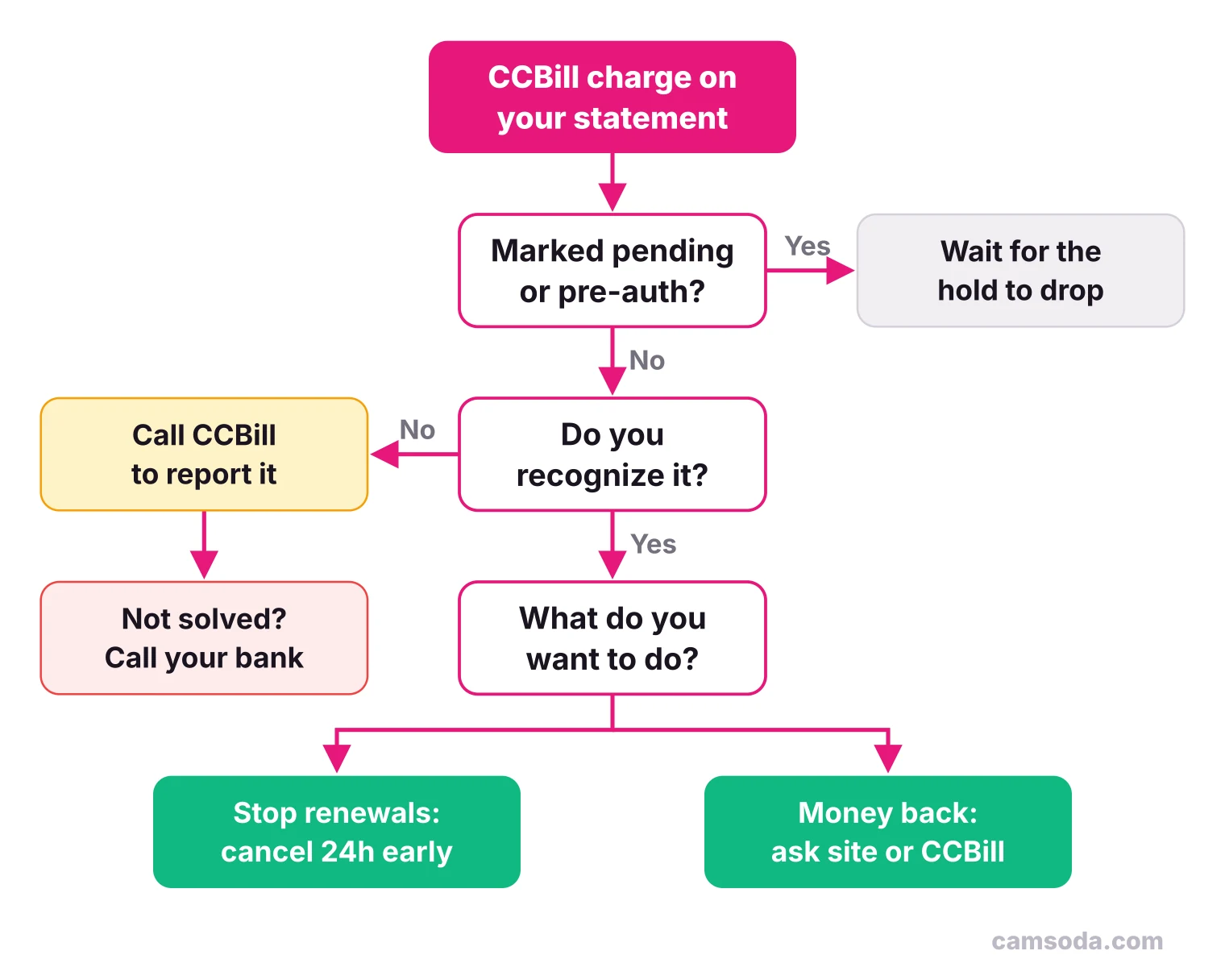
How to look up a CCBill charge
CCBill’s consumer support site finds the subscription or purchase behind a charge, tells you which website it belongs to and lets you manage it. Here is how to use it:
- Gather what you have. Note the date and amount on your statement, the card or account you paid with, and every email address you might have used. Search your inbox for “CCBill”: CCBill sends a confirmation email after each purchase, and it contains your subscription ID number.
- Open support.ccbill.com and choose how you paid. The form offers credit card, online check, telephone billing, SEPA Direct Pay, GiroPay, iDEAL and Latin American billing.
- Enter any two identifiers. The form accepts two of the following: email address, card number, account number or IBAN, transaction ID, subscription ID.
- Try other combinations if nothing comes up. CCBill says the search only finds subscriptions tied to the exact details you enter, so try your other email addresses and cards.
- Contact a person if the search fails. CCBill lists phone support at 1-888-596-9279, open 24 hours a day, 7 days a week, plus live chat, an online form and email at [email protected]. From outside the US, use the international numbers on CCBill’s contact page.
Once the subscription comes up, you can see which site it belongs to and cancel recurring billing from the same place.
How to cancel a CCBill subscription before it renews
You can cancel through the same lookup on CCBill’s support site, by phone or by email. If the site has its own cancel option and you use it, keep its confirmation email too.
Timing is the detail most people miss. CCBill says a recurring membership must be canceled a full 24 hours before the end of the billing period to stop the automatic renewal. Its help pages add that recurring billing cycles start at signup and rebill to the minute from the first transaction.
Illustrative example: you join a 30-day membership on March 1 at 9:00 p.m. It renews on March 31 at 9:00 p.m. To be sure you are not billed again, cancel before 9:00 p.m. on March 30. Canceling on the morning of March 31 is too late for that renewal.
Three more things CCBill’s help pages say about canceling:
- You keep access to the site until the end of the term you already paid for, whatever time you cancel.
- Canceling stops future charges but does not refund past ones: subscription fees are not refundable when you end a membership.
- If you were charged after canceling, forward the cancellation confirmation email (from CCBill or the site) to CCBill Consumer Support, which says it will credit charges made in error.
CCBill refunds: who decides and how long it takes
CCBill processes refunds, but the website’s policy decides whether you get one. CCBill says not all of its clients have the same refund policies, and asks you to contact its 24-hour consumer support to check whether you are eligible. When a refund is approved, CCBill says the money should post back within 7 to 10 business days, and only to the account it came from: no cash, check or transfer to another card.
If the problem is the product itself, such as content you did not like or something that never arrived, start with the website. CCBill says it does not own or operate the sites it bills for and cannot judge their content, and that site owners should display their contact details. If you cannot reach the site, CCBill support can help you contact it.
If you don’t recognize the CCBill charge
Run the quick checks first: ask anyone who shares the card, search your email for “CCBill,” and think back to free trials and old memberships. Most unknown CCBill lines turn out to be a forgotten renewal.
If none of that explains it, treat it as possible fraud:
- Call CCBill consumer support at 888-596-9279. CCBill asks you to report fraudulent charges by phone so it can verify that you are the account holder, investigate the charge and stop further charges. It also says it cannot catch every fraudulent transaction, so yes, someone can run a charge through CCBill with stolen card details.
- Contact your card issuer or bank. Report the charge as unauthorized and ask about its dispute process. If your card number may be compromised, ask for a new card.
- Keep records. Save the statement line, the dates of your calls, any reference numbers and emails.
A bank dispute is the right tool for a charge you did not authorize, or one the merchant and CCBill will not fix. For a purchase you did make, cancel and ask for a refund first. CCBill notes that a card with a history of chargeback disputes and refund requests can end up blocked for many online purchases.
Pending CCBill charges, trial holds and “charged twice”
Some CCBill lines are not charges yet. CCBill’s page on pending transactions explains the two usual causes:
- Authorization holds. When you try to buy something, your bank holds the amount until the transaction settles or is canceled. Even when the purchase is declined, CCBill says the hold can stay on your balance for 3 to 7 business days, depending on your card issuer.
- Free trial holds. When you start a free trial with a card or checking account, your bank puts a hold for the price of the plan you chose. CCBill says these funds can stay unavailable for up to 7 to 10 days after you cancel.
Seeing two lines for one purchase on a debit card is usually the same thing: CCBill explains that the system first sends a test transaction to check your funds, then the real one, and some banks show both. Only one takes money; the pending one drops off on its own. CCBill also says its system will not let you buy the same subscription twice, and two separate confirmation emails mean two separate purchases. If a pending line does not clear, contact your bank.
CCBill charges from cam sites
Cam sites usually offer several payment processors, so the name on your statement depends on how you paid, not only on where. CamSoda, for example, lists Epoch, PayPal, CCBill, Rocketgate, Segpay and Paygarden as its biller options. If your line names one of the others, see our guides to an Epoch charge and to what Segpay is.
Two details change what you do about a cam site charge:
- Tokens are usually one-time purchases. Buying a token package is not a membership, so there is nothing to cancel and no renewal date. You pay tokens to tip, unlock features or start private shows; our guide on how cam sites work explains the model.
- Opt-in features can create later charges. CamSoda’s purchasing tokens page describes Easy Re-ups, an optional automatic token top-up, and Token Credit, which where enabled lets you spend up to a daily limit and be charged later. If you see a charge you don’t remember from a cam site, check whether a feature like this is on in your account before assuming fraud.
Don’t assume how any cam site’s purchase will read on your statement. Check the payment page when you buy, and your statement afterward. If you are about to buy tokens, the purchasing tokens page above lists CamSoda’s packages and payment methods, so you can pick a biller and decide on the opt-in features before you pay.
Is CCBill legit?
Yes. CCBill is an established payment processor that has operated since 1998, by its own account, with 24-hour consumer support and published policies for refunds and cancellations. CCBill says its sign-up pages are encrypted and that merchants do not see your card number. If a payment page looks questionable, CCBill asks you to contact its consumer support to confirm the page is genuine before you enter details.
A legitimate processor does not make every site it bills for a good one. The site sets the price, the renewal terms and the refund policy, so read those before you pay. Our guide to whether cam sites are safe has a checklist for telling a real platform from a scam.
Which sites bill through CCBill?
CCBill’s consumer help pages do not list its merchants, and sites can add or drop a processor at any time. Third-party descriptor lookup sites compile lists of brands seen on CCBill lines, but those are estimates. The reliable answer for your own charge is the lookup on CCBill’s support site or the confirmation email from your purchase. People often ask about OnlyFans specifically: some lookup sites list it among brands billed through CCBill, but we have not confirmed that on its own pages, so rely on your confirmation email rather than a list.
Frequently asked questions
What is CCBill on my bank statement?
It is a payment to a website that uses CCBill, a third-party payment processor, to charge cards. The line shows CCBill.com or CCBillEU, often with letters that hint at the merchant and a toll-free number. Look it up at support.ccbill.com or call 1-888-596-9279 to see which site it was for.
Is CCBill legitimate?
Yes. CCBill is an established payment processor that says it has operated since 1998, and it offers 24-hour consumer support for cancellations, refunds and fraud reports. Whether a purchase was worth it depends on the website it billed for, not on CCBill.
How do I unsubscribe from CCBill?
Find the subscription at support.ccbill.com with any two identifiers, such as your email and card number, and cancel it there, or call CCBill’s consumer support. CCBill says to cancel a full 24 hours before the end of the billing period to stop the next renewal, and you keep access until the paid term ends.
Can someone charge my card through CCBill without my permission?
Yes, it can happen: CCBill says it cannot catch every fraudulent transaction. Call CCBill consumer support at 888-596-9279 to report it and stop further charges, then contact your card issuer to report the charge as unauthorized and ask for a new card if needed.
Why is there a CCBill charge when my purchase was declined?
It is most likely an authorization hold, not a completed charge. CCBill says a hold can stay on your balance for 3 to 7 business days after a declined attempt, depending on your card issuer. If it does not clear, contact your bank.
Is CCBill for OnlyFans?
Some third-party lookup sites list it among the brands billed through CCBill, but processors can change and we have not confirmed it on the platform’s own pages. For your own charge, the CCBill lookup or your purchase confirmation email shows exactly which site it was for.