
Daftar akun GRATIS sekarang,
tanpa perlu kartu kredit!
BerandaTagShow privatVideo BokepGame SeksVideo ModelKencanReferensikan Teman - 100 Token
Cam Live Camsoda
Mode Gelap:Mati
Pendaftaran Model
  1. beranda
  2. support
  3. faq
  4. user faq
  5. misc
  6. how do i use the voyeur cam playback feature?

How do I use the Voyeur Cam Playback feature?

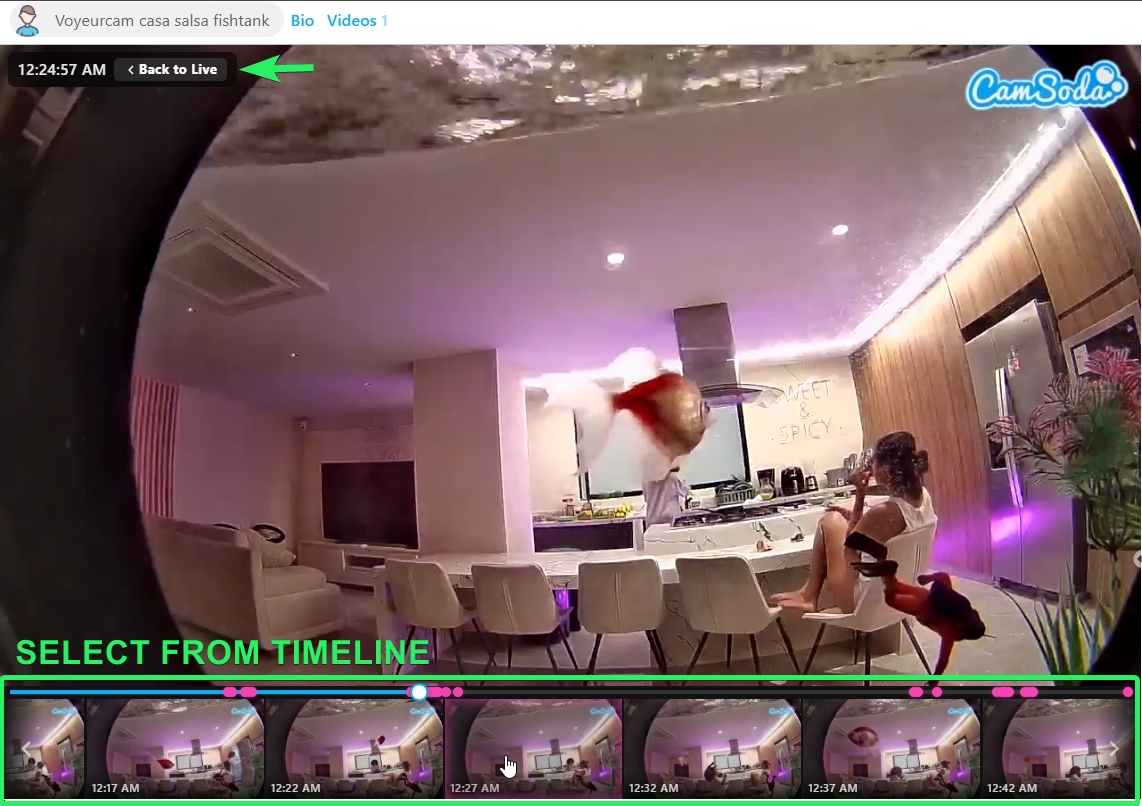
To use CamSoda's Voyeur Cam Playback feature:

  • Locate the timeline underneath the voyeur broadcast window to view activity in the room over the previous 24 hours.
  • Tap a point on the timeline to view that part of the stream.
  • The approximate time of playback is located in the top left of the broadcast window
  • Jump back to real time by tapping Back to Live.
tracking pixel